

Key Takeaways
- Auto-renewal sign-ups are commonly hidden inside standard online checkout flows via pre-checked boxes or bundled offers.
- Reading order confirmation emails carefully often reveals subscription enrollments you didn't knowingly authorize.
- You can dispute unauthorized recurring charges with your card issuer if a retailer's cancellation process is unresponsive.
- Auditing your bank and credit card statements monthly is the most reliable way to catch unwanted recurring billing early.
- Federal rules require negative-option marketing to be clearly disclosed - you have grounds to push back when they aren't.
What you will need
How Hidden Subscriptions End Up in Your Cart
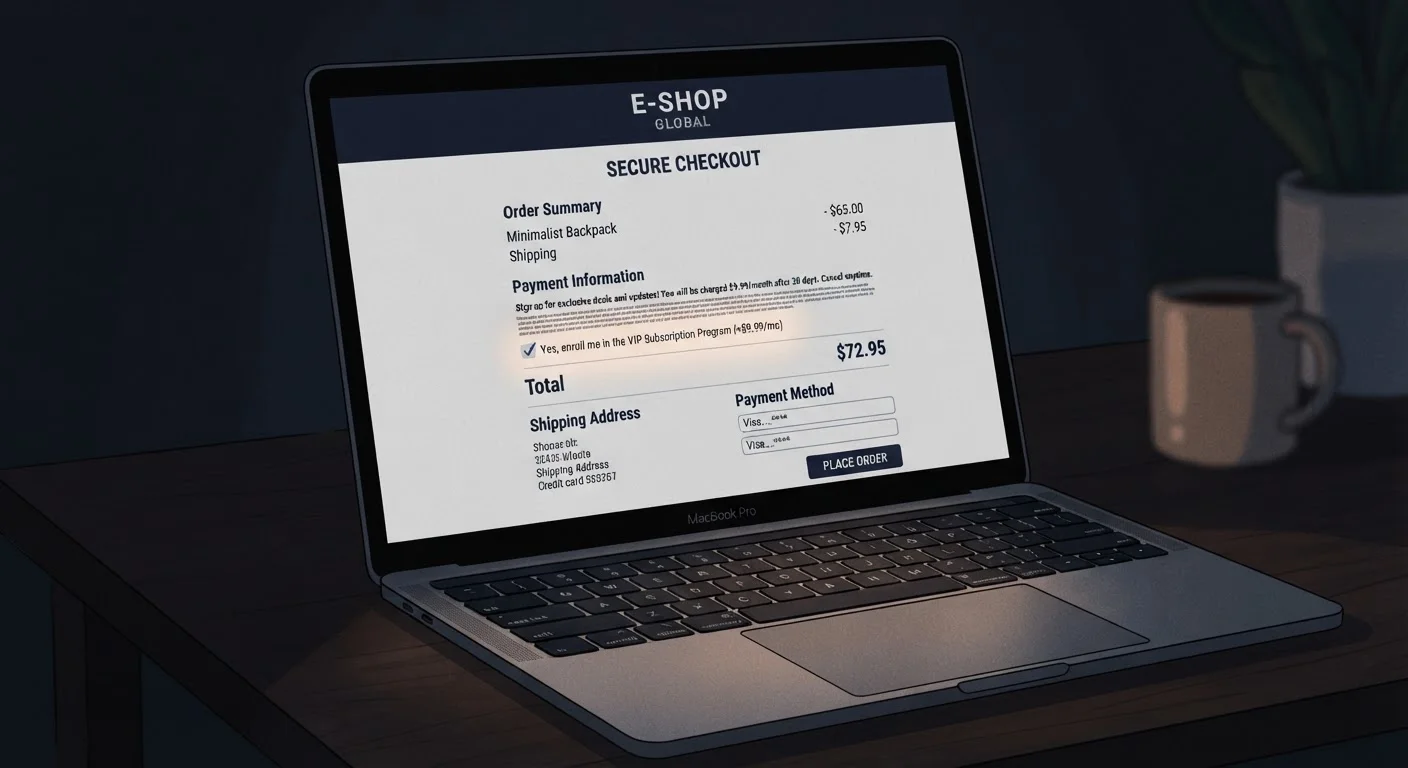
Auto-renewal enrollment at checkout - sometimes called negative-option marketing - works by presenting a subscription as part of a standard purchase flow. A shopper focused on completing a one-time order may not notice a pre-selected add-on, a bundled "free" trial, or a savings offer that converts to a monthly charge. Checkout interfaces are often optimized to make the opt-in small and the "continue" button prominent.
Common patterns to recognize include: a discount on your current order that's funded by enrolling you in a paid membership; a "protection plan" or "priority access" add-on checked by default; and a free trial that begins at the moment of purchase without a separate confirmation step. These designs aren't always illegal, but they rely on inattention - and that's worth understanding before you click.
Surprise charges at checkout aren't limited to subscriptions. Our guide on why your cart total changes at checkout covers the full range of fees and additions that can inflate a final bill. Similarly, knowing how to spot a fraudulent online store before entering payment details helps you avoid environments where disclosure practices are even worse.
Credit or debit card statement (PDF or online)
Used to identify recurring line items that may represent unwanted subscriptions.
Email search function
Search your inbox for terms like 'membership,' 'subscription,' or 'auto-renew' to surface enrollment confirmation emails.
Screenshot or screen recording tool
Capture checkout pages before completing a purchase to document what was disclosed - useful if you need to dispute a charge later.
Virtual card number (if available from your issuer)
Limits a merchant's ability to bill future charges if you decide not to continue a trial or membership.
Step-by-Step: Identifying and Stopping Unwanted Subscriptions
Whether you're dealing with a subscription you just noticed or trying to prevent one from happening in the first place, these steps give you a clear path from checkout awareness to confirmed cancellation.
What you will need
Slow down at checkout and read every pre-checked box
Before entering payment information, scroll through the entire checkout page. Retailers commonly insert subscription opt-ins as pre-checked checkboxes positioned between the shipping address and the payment button - areas shoppers glance at rather than read. Look for language like "Save 15% and join our monthly program," "Add a protection plan (billed annually)," or any recurring dollar amount listed separately from your item total.
Uncheck any box you didn't consciously select. If unchecking one causes your subtotal to change, that confirms a subscription was bundled into your order.
Read your order confirmation email within 24 hours
Immediately after a purchase, open the confirmation email and read it fully rather than just checking the order total. Subscription enrollments are frequently disclosed here for the first time - or buried in a paragraph below the itemized receipt. Look for phrases like "Your membership begins today," "Your free trial has started," or a separate line item showing a recurring charge date.
If you see a subscription you don't recognize or didn't intend to join, act immediately - many merchants allow cancellation within a short window before any charge is processed. This is also the moment to take a screenshot for your records.
Search your inbox for subscription confirmation emails
Open your email client and search for terms such as: subscription, membership, auto-renew, trial, recurring, billing cycle, and cancel anytime. This surfaces enrollment confirmations you may have missed over time. Cross-reference any results against your current card statement to determine whether charges are still active.
This step is especially important if you've shopped with multiple retailers over the past year. Promotional trial offers routinely convert to paid subscriptions after 7-30 days, and the conversion notice is often a single email that's easy to overlook.
Review your card statements for recurring line items
Pull up the last two to three months of statements for every card or bank account you use for online shopping. Sort or scan for charges that repeat in the same amount from the same merchant. Amounts of $4.99, $9.99, $14.99, and $19.99 per month are particularly common subscription price points - flag anything in that range you can't immediately identify.
For each unrecognized recurring charge, search the merchant name online (add the word 'subscription' or 'cancel') to confirm what the charge is and how to stop it. For a structured approach to this process, see our guide on auditing forgotten recurring charges.
Cancel through the merchant's account portal first
Log in to the retailer's website and navigate to your account settings - look for sections labeled Membership, Subscriptions, Billing, or My Plan. Most legitimate merchants are required to offer a self-service cancellation path. Complete the cancellation and save or screenshot the confirmation page or email.
If the cancellation flow is deliberately obstructive - requiring a phone call, presenting multiple retention screens, or failing to show a confirmation - document everything and proceed to your card issuer as a backup. Deceptive cancellation practices are a reportable violation under FTC guidelines.
Dispute unresolved charges with your card issuer
If a merchant continues to charge you after cancellation, or refuses to cancel at all, contact your credit or debit card issuer to initiate a dispute. Provide your order confirmation, the cancellation confirmation (if you have one), and a brief written explanation. Card issuers generally have 60-day dispute windows from the statement date for billing errors - don't delay.
You can also report the merchant to the FTC at ftc.gov/complaint and to your state attorney general's consumer protection office. Deceptive auto-enrollment is a regulated practice, and complaints contribute to enforcement action.
Managing unwanted subscriptions is part of a broader strategy for cutting recurring household expenses without sacrificing what you actually use and value.
You Have Legal Protections Here
The FTC's Negative Option Rule requires businesses to clearly disclose subscription terms before a consumer is charged, obtain express informed consent, and provide a simple cancellation mechanism. If a recurring charge appeared without clear disclosure, you can file a complaint at ftc.gov/complaint and dispute the charge with your card issuer. Keep records of your original order confirmation as evidence.
Cancelling Doesn't Always Stop the Charge Immediately
Many subscription services continue billing through the end of the current billing cycle even after you cancel. Always note the date you cancelled and monitor your next statement to confirm no additional charge appears. If one does, escalate to your card issuer with your cancellation confirmation as documentation.
Use a Virtual Card Number for Trials
Some banks and credit card issuers offer single-use or merchant-locked virtual card numbers. Using one for free trial sign-ups prevents a merchant from successfully billing a recurring charge if you forget to cancel. Check whether your card issuer offers this feature in their mobile app or online portal.
Staying ahead of subscription creep is also a core part of smart budgeting - small recurring charges accumulate into a meaningful monthly drain faster than most families expect. Building a monthly statement review into your routine is one of the simplest and most reliable financial habits you can adopt.